Wednesday, July 25, 2012

Update - More Ways to Read DMG Titles!

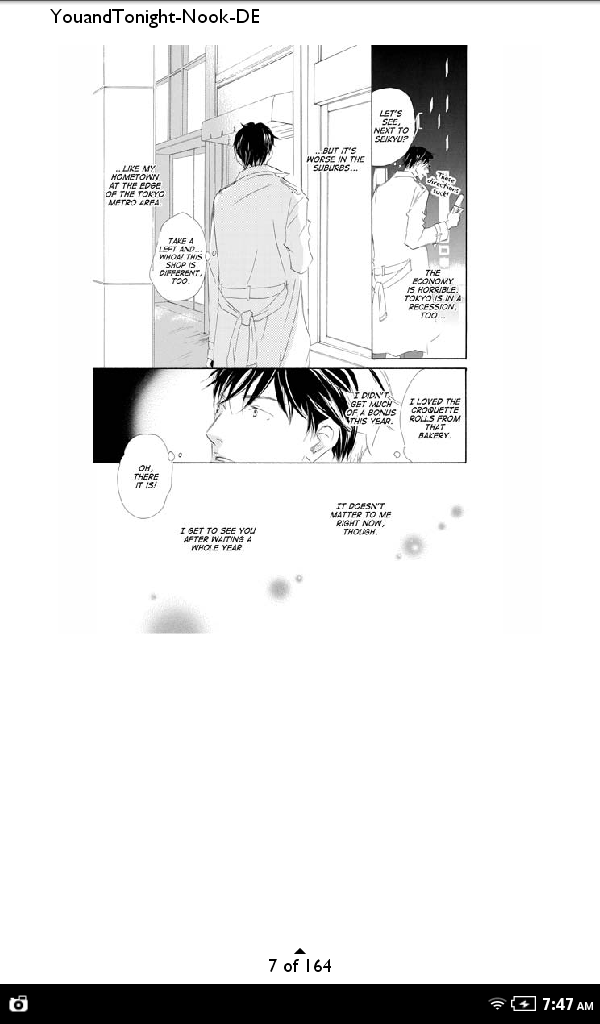
In the past month or so, Digital Manga titles have become available through several more outlets. I'm super swamped with stuff right now, but I hope to take a closer look at the quality and interface of these options soon. Gah I am such a goober. I couldn't resist taking some screenshots.

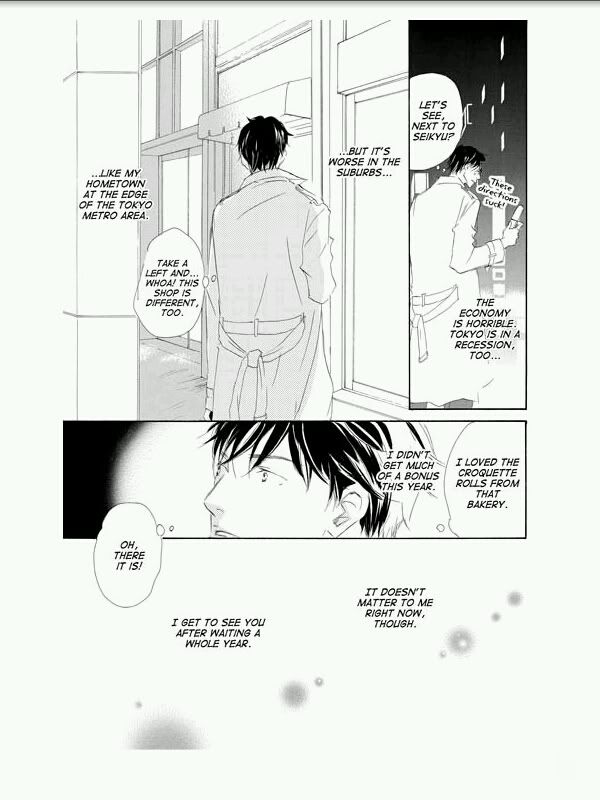
First is the most recent announcement: www.DriveThruComics.com. I had never heard of this site before, but it provides what people have been requesting for ages: DOWNLOADABLE PDF FILES. I couldn't resist and just bought Entangled Circumstances. The file rolled in at 17 MB and is comparable to Nook quality (which is good). I was going to get Rainy Day Love since I could compare it directly to my own lettered files, but I didn't want to pay for something I already have XD 


Note the watermark in the lower left corner - it's on every page. I applaud the effort, but someone who wants to post their pdf on the internet can get around that pretty easily... The FAQ says that you can read the PDFs on iPad, Kindle Fire, Nook Color, and Android tablets, and so far I can say it looks great on my iPhone and iPad. I just emailed the pdf to myself and opened it using the native PDF reader.

Small side text looks good zoomed in on an iPad!


Also announced today was that Digital Manga titles are available on Graphicly, which has a Facebook App in addition to their online viewer. Maybe I'm just being cranky because the Graphicly website is annoying me, but their online viewer is pretty terrible if the preview pages are any indication. Quality looks fine, but the page turning is slow and clunky and it goes left to right. They have a banner saying they support damn near every format from iOS to Android to Kindle, Nook, Kobo, and beyond, but when I look at the page for a DMG title (e.g. A Truthful Picture), it says "Buying from Graphicly unlocks this book on both the Graphicly Facebook Application and the Graphicly Website." Do any Facebook users read manga on the Graphicly App? Is it better than this crappy online reader on their main website? Unless someone leaves a comment with a glowing review and happy recollections, I probably won't revisit Graphicly (also I am not a FB user, so that doesn't add any value for me personally).

Digital Manga is also on Comics Plus, which is availble on everything (iOS, Android, etc etc), though right now it looks like there are only books from the main DMP imprint (no June or DMG). I think this cross-platform super-availability is going to be more and more ubiquitous in the future, and the real question is going to be which Japanese publishers and mangaka are willing to sell a license to actually distribute on these platforms and in these file formats.

As for me personally, I'll be buying my DMP manga from DriveThruComics whenever possible. I like the idea of downloading the pdf and then choosing my own reading device. Also, I see Project H and 801 books, so one can assume there won't be a censorship problem. I hope this business model remains feasible (and the cynic in me can think of a hundred reasons it could fail), but you can be sure I will be enjoying it while I can!

Saturday, March 10, 2012

DMP iPhone App and Nook Desktop Reader

Ok, now these posts are getting eclectic. There are too many new devices to keep things organized! I'll leave it to the summary page linked from the sidebar to handle organization, and my posts will cover things as they arise.

Yesterday, DMP released an iPhone app similar to the app for iPad. As expected, the iPhone interface has been scaled down for a smaller screen, and some of the features have been lost. Now there is a scrub bar for jumping forward or backwards through pages, but no thumbnails like the iPad version. Also, the storefront is just one big list of (unordered) titles instead of being collected by genre and imprint (DMG, June, 801) like the iPad version. What really surprised me was the quality of the image, and I suspect Apple's retina display may have more to do with this than DMP's file quality. Of course DMP is serving a high quality file, but man, 326 ppi makes the text looks nice and crisp! Another fantastic feature of this app is that you can pinch to zoom in (again, everything is instinctual and responsive to touch), and you can swipe to the next page without zooming back out. This may seem like a trivial thing, but it's not! It makes for a much more enjoyable 200-page reading experience.

Details and small text look great while zoomed in.
Double tap to zoom back to full page.


I also found out recently that Nook has a desktop reader for your computer, too - similar to the Kindle desktop reader. There aren't any surprises here. Quality is what you should expect by now - solidly good. The downside is that you can't zoom in beyond the actual file size of ~700 px. So if small side text is hard to read, you find yourself squinting and leaning closer to the monitor. I was really surprised by this oversight. With B&N's emphasis on comics and graphic novels, hopefully they will improve this feature to work better with images (and not just text).

Nook Desktop Reader on left, eManga on right
The point still goes to eManga for best DMG reading experience on the computer. Nook, like Kindle, was made for reading left to right.

Thursday, March 8, 2012

Amazon & Apple Pull Titles, Android & BN Still Uncensored

First, Apple decided to restrict the books that DMP could sell in their iTunes app. While disappointing, I don't think anyone was terribly surprised since Apple is known for its primness and properness when maintaining its gated community.

Then, Amazon refused to sell one of the edgier, BDSM titles from DMG. One of the localizers reported that DMG was asked to remove pages or cover up naughty bits or both. And now, apparently, Amazon is refusing to list anymore DMP titles until the censorship situation is resolved. I'm wondering if Amazon finally realized that the previews of DMG titles often had explicit sex in them and were available for viewing by anyone. He's Mine (localized by Mi3) starts off with a threesome, and anyone in the world could have read that scene. If that really is the case, I don't blame them for panicking since businesses and ukes alike need to CYA. Someone with a young child and a penchant for litigation (read "half of America") could have a field day. And it's possible that Amazon's panties are in a twitch over something completely different, but whatever the reason, they should have addressed it when the books were initially released and not create a huge problem for everyone now. As for the greater issues of possible LBG prejudice, censorship in general, and Amazon's role in publishing, I leave those for the more articulate and passionate people. I'm just here to compare digital readers.

So how do these changes affect buying and reading DMG titles? Well as I'm sure you know by now, Kindle quality is so-so, and if you didn't know this, click the link on the sidebar to see a comparison of the different digital platforms. What really broke my heart was the censorship of titles in the DMP iTunes app since the files were HUGE, which made for the best quality available. The good news for some is that the Android market remains a bastion of unfettered freedom. The DMP Android app is just as high quality and well designed as the iTunes version, and all DMP titles are available. For those of us who already own an iPad and won't be purchasing an Android tablet anytime soon, fear not. Barnes and Noble has not restricted any titles, and the quality of the Nook app for iPad is very good even though the pages are not optimized for the screen. And for those who don't read the super-explicit 801-ish titles, well, just keep doing what you're doing :P

Samsung Galaxy Tab running DMP app
Galaxy Tab again


If anyone has a different Android tablet and has installed the DMP app, please send me some pics! I'm always curious to see if fragmentation is really an issue or if it's just something people like to blow smoke about. Just a photo with your cell phone is fine, and you can load up a free preview of any book as an example ;)

Thursday, February 23, 2012

Kindle for Mac vs. eManga - Reading on Your Computer

eManga is Digital Manga Publishing's online storefront that directly sells DMG titles. Purchased titles are streamed through your browser via their online reader, so books are not downloaded as files. The image quality on eManga is very, very good, and you have a few page size settings to choose from. In the screenshot below, eManga is on the left and is zoomed to 800 pixels high. The small side text in a handwritten font is easy to read, and there are almost no compression artifacts. You can view one or two pages at a time, and of course, when you view two pages, they are oriented right to left like native manga.

As mentioned in previous posts, Amazon's Kindle format has some image compression that creates artifacts, which makes some side text difficult to read and makes some of the gray patterns ugly. The image quality is comparable to the Kindle iPad app, and there's no way to zoom in. Full screen mode puts the pages side by side, but they are left to right like English books, and I haven't found a way to only show one page or swap orientation while in this mode. Don't use full screen mode.

The bottom line is that eManga is optimized for reading manga and has no file size restrictions since it streams one page at a time. Amazon limits file size and so the quality suffers here and on other devices. If you enjoy reading on your computer and do not mind streaming, then eManga is your best option.

eManga on the left, Kindle for Mac on the right

See all the small gray dots around the text? Those are compression artifacts. Notice that the gray tone on the right has some weird plaid patterns, too. Those shouldn't be there.

Wednesday, November 30, 2011

DMG Titles: Kindle vs. Nook vs DMP App

Big thanks to Boys Love Bang Bang ( @BLBangBang), prettyism, @DefiantAndi from Defiant Endeavors, and azurelucy for contributing pictures of their devices!

First up, the Kindles! I was disappointed by how The Rule of Standing on Tiptoe appeared on my graphite Kindle (top left), but it looked much better on prettyism's Kindle (top right). I have no idea why since they appear to be similar models, but maybe I just need to fiddle with my settings.

a) My older Kindle
b) prettyism's Kindle

c) BLBB's Kindle Fire
d) iPad Kindle App


BLBB's Kindle Fire (bottom left) still has some white space, but the contrast looks pretty good. Considering the price of the Fire, this is a pretty sweet toy. Enjoy, hun! To round things out, I've also included the Kindle iPad App (bottom right). As mentioned in a previous post, there's lots of white space since the files were made for a different sized screen, but the quality is still good.

Without geeking out and getting consistent lighting and scale references and good cameras (I used an iPhone), it looks like the Kindle iPad app and the Fire are pretty comparable. You can zoom in on both, but both BLBB and I agree that there is an unfortunate amount of image compression, and the artifacts make reading small side text difficult. Also, you can't swipe to the next page when you're zoomed in. You have to hit the X to close the zoom window before moving on.

Also, Amazon has rejected an explicit BDSM DMG title, and it's unclear if more titles will be removed in the future. I'll update here as we find out more info.

Next up are the Nooks:

e) Andi's Nook
f) azurelucy's Nook Color (with a regular Nook edition)


g) Rae's Nook Color (with a Nook Color edition)
h) Nook iPad App


They look comparable to their respective Kindle counterparts, but due to circumstances beyond our (and DMG's) control, the Nook file format is higher quality than the Kindle file format. There's no noticeable compression or artifacts, and the files are still negligibly small on broadband (~15 MB).

There are two editions of each book: regular and color. The Color Edition is formatted to fit the dimensions of the larger screen, which is why Rae's DMG title fills the screen and lucy's still has some margin. For the record, BN has not rejected or pulled any DMP titles.

And then there's the DMP app available for iPad and Android tablets:

i) DMP's iPad App
j) DMP's Android App (Samsung Galaxy Tab)


...which is the best quality for the iPad, but books are $1 more than Amazon and BN (see this post). Apple has pulled DMP's more explicit titles from the DMP app in iTunes, but lucky Android owners still have the full library.

For the technologically savvy folks, here's a screenshot from a rooted Sony PRS-T1. The dimensions of the manga match the screen, so this is a good alternative to a Kindle Touch or Nook Touch.

k) azurelucy's Sony PRS-T1 running Aldiko


I'm always on the look out for more pictures of DMG titles on readers and to hear what your experience has been like with digital manga.

Saturday, November 12, 2011

Digital Manga Publishing App

DMP just released an Android and iTunes app for downloading and reading manga. I can only vouch for the iPad version, and the image quality is fantastic. The pages are formatted to fit the iPad perfectly, and they look good even when you zoom in.


The interface is intuitive and responsive (I've tried manga readers where you had to swipe hard and decisively to turn the page), and there was no lag when I was swiping through the pages quickly. Each book has a 10-page preview, though for many of them, the first 9 pages are all title, table of contents, credits, etc.

The only strange thing is that the DMG titles are $8.99 compared to $7.95 on Amazon and Barnes & Noble. I guess you get what you pay for, though, since it is a better iPad reading experience than the Nook or Kindle app (I mentioned in a previous post that the Nook and Kindle pages are sized for the e-readers and don't fill up the entire iPad screen). I'm still waiting to see if anything changes when the new Nook and Kindle tablets come up, but for now, this DMP app is the best option for reading DMG titles on an iPad.

EDIT: I figured out the reason the titles are more expensive using the iPad app. The books are in-app purchases and are charged to your Apple account, not to your eManga or other DMP account. Since Apple takes a cut, DMP priced everything higher accordingly. The books range in the 100 MB range, which explains why the quality is fantastic.

iTunes App Store
Android Market

Friday, October 21, 2011

Kindle vs. Nook

I'm our biggest fan! I bought Tiptoe for both Kindle and Nook because I wanted to compare the two versions. I have an iPad, so my caveat is that I'm not able to compare the two platforms on their original devices.

Right off the bat I noticed that Nook's file size is much bigger than Kindle's. Tiptoe for Nook was 17.3 MB whereas Kindle was only 11.4 MB. As you might guess, this translates directly to quality. The Nook version had much fewer compression artifacts, and the gray tones were crisper and cleaner. Both versions had some white space around the edges because the pages are formatted to fit the aspect ratios and resolution on the actual Kindle or Nook and not an iPad screen. The Kindle version does have a pinch-to-zoom feature, but it only served to emphasize the compression. Nook has no zoom.

I don't know if Amazon limits the file size for Kindle books, but Attacked on a Tiger's Whim and Healing Music (also DMG titles) also had a larger files for Nook. With the upcoming Kindle Fire and rumored Nook tablet, interfaces and apps may change, but for now, if I had to choose, I would undoubtedly go with Nook for iPad. The extra 6 MB made a huge different in quality, and only took an extra few seconds to download.

EDIT 11/8/11: At the last DMG videoconference, the DMP staff confirmed that Amazon and B&N use different file formats with different levels of compression. Also, Amazon charges DMP for bandwith usage while B&N does not (though B&N still has a file size limit).